
We know that sometimes it can be hard to know where to start when helping people to learn digital skills and to stay safer online. This is why we worked together with people with intellectual disability and their supporters to create Conversation Cards.
These cards provide a fun and educational way to get a conversation started and teach digital skills. This guide includes tips on how to use the cards and where to find more resources.
What are Conversation Cards?
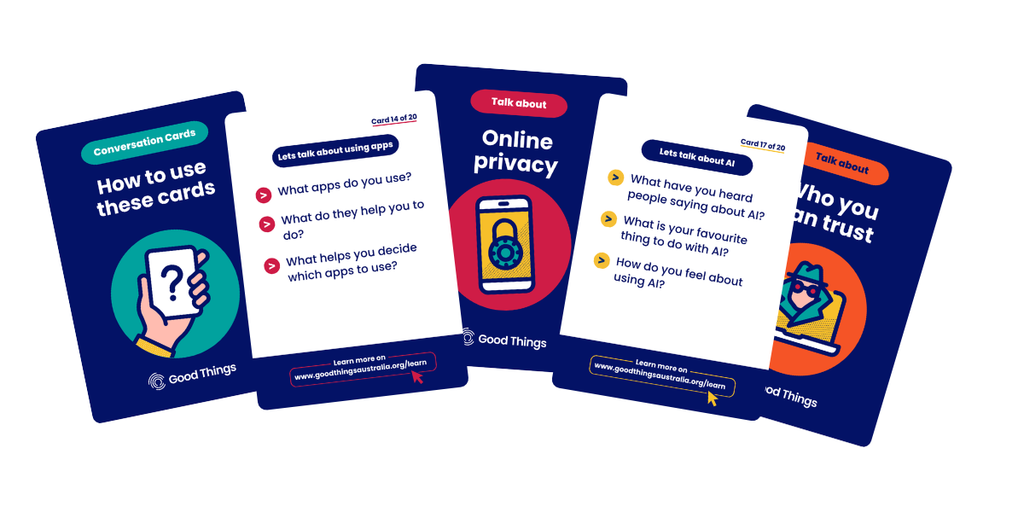
Designed for people with limited digital skills and in easy to read language, the Conversation Cards aim to show what is possible by going online but more importantly, how to do it safely.
Every pack contains 19 conversation starter cards and 1 how to card. On the front of each card you will find a key topic. On the back of the card is a set of questions designed to help you start a conversation about the topic. This will help you to identify what your learners already know about the topic, encourage learners to problem solve and allows you to share tips and hints to support your learners ongoing digital skills development.
Tips on using the Conversation Cards
1. Make learning fun and personalised
Using the Conversation Cards should not feel like a lesson or an interview. Use the Cards in a way that works for you and the person you are supporting. This could look like a picnic and a chat on topic they are interested in, or a conversation while you are gardening together.
Start your online safety conversation at their pace and do not rush it. This can help with building future confidence, trust and openness to learn something new.
Top tip: Think about an activity the person you support enjoys doing and how you can use the Cards in conversation!
2. Have examples and questions ready to keep the conversation going
Use the Conversation Cards as the starting point for your online safety chat. Have examples ready to share for each card, or have open ended questions to keep the conversation going!
Using examples can help with learning and reflecting on the topic.
Open ended questions can help you better understand where they are at. For example, if you are using the ‘Online safety’ card you can ask the person you are supporting with follow up questions like: What does a strong password look like? What does a weak password look like?
3. Share resources to help with further learning
Use our free online learning resources to help you answer any questions that come up. You will find resources like:
- Games like Be a scam detective to spot email or text scams
- Tip sheets on topics like tips to stay safer online
- Easy Read AI resources
- Videos on topics like what to share online
- And more!
Visit eSafety’s website for more resources and information on how to support people with disability.
4. Use them to help bring up tricky topics
If you support a young person to learn digital skills, such as a young adult with intellectual disability, you can use these cards as a reference to help bring up tricky topics.
Choose a time when things are quieter and you are together, such as a car trip or walking the dog.
For example, before you get in a car or get the dog ready, look at the “Trolls” card. Bring up the questions on the back of the card as a conversation starter on your journey. Have a chat about the questions on that card, and understand their experience and knowledge about trolls. Share your own experience and knowledge too.
Offer to support them when you get home if they bring up something concerning or you both discover that more could be learnt on that topic.
5. Using them with a group of people
Use one of the cards as a 10 minute icebreaker activity to people talking about the things they know about and encourage people to share with others. This builds learner confidence and creates social connections if there is someone else in the group that does the same things.
For example, start with the “What you enjoy” card.
Read out the first question, “What do you enjoy about going online?” Give everyone a few minutes to share what they enjoy doing online.
Read out the second question, “What would you like to do online that you cannot do yet?” and give everyone a few minutes to share that info too.
To finish, recap the discussion focussing on the topics identified and the similarities within the group. Pick out one or two things from the discussion that you will be covering with them that day or in future, so they can look forward to it.
Making the Cards
Good Things Australia worked with Down Syndrome Australia to create the first edition of the Conversation Cards in 2024. The card kit has been updated, tested and used with people with intellectual disability and their supporters. The 2026 edition of the Conversation Cards have been created as part of our Games for Good program. Good Things would like to thank Google.org for their support of this program.

Love these cards?
Good Things also has Yarning Cards available to order to support First Nations communities through our Be Connected program. Learn more about Yarning Cards.