
We have put together a quick guide to help you support your community with AusAlert.
What is AusAlert?
AusAlert is the new way the Australian government will send emergency warnings to your device. It will be used to warn you about natural disasters like bushfires, floods and other emergencies near you. AusAlert will start in October 2026.
In July 2026 everyone in Australia will receive a test AusAlert. All compatible mobile phones, tablets and smart watches will get an alert.
Different types of alerts
There are 2 main types of AusAlert:
- 🚨 Critical alerts: These are for really serious emergencies.
- ⚠️ Priority alerts: These are for emergencies that might get worse.
What will the alert look like?
The alert uses a loud 10 second siren, vibration and a message.
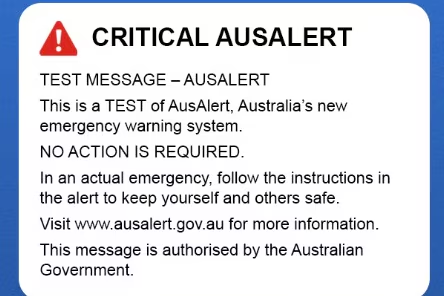
This is an example of what the test AusAlert will look like in July.
The alert will tell you:
- What is happening (like a fire or a flood)
- Where it is happening
- How dangerous it is
- What you must do to stay safe
- Where to find more help
- Who sent the warning
Getting ready for the alert
If you get an AusAlert, read the message slowly, follow the instructions and ask for help if you need it!
Turning off AusAlerts
- Critical Alerts (The most important): You cannot turn these off. You will always get these messages unless your phone is turned off or on aeroplane mode.
- Priority Alerts: You can choose to turn these off in your phone settings.
Tip: Visit the AusAlert website to learn how to turn off Priority alerts on Apple, Android or other devices
How you can help your community to get ready
Host a digital skills info session about AusAlert:
- Icebreaker: Welcome everyone with a cup of tea and biscuits. Ask everyone to introduce themselves and share one thing about how they find reliable emergency information.
- Discussion (Connect to topic): Ask the group if they have heard about AusAlert and the test alert in July. Explain what AusAlert is.
- Online learning: Play the animated explainer video on a big screen. Open the official AusAlert website, show what the emergency alerts look like and any other important information on the website. Don’t forget to include important safety tips about other ways to find reliable information in an emergency. Tip: Use the resources to cover any topics that might be useful for your community!
- Practical activity: Ask everyone to open the official AusAlert website on their device. Give your learners three tasks that will help them find information on the website, like checking if their devices are compatible, finding out how to turn on and off the alerts, and seeing when the test will happen in your area. Tip: Encourage people to play the AusAlert tone on their device so they can prepare for the test alert in July.
- Reflection: Ask everyone to share one thing they learnt about AusAlert. Hand out the printable fact sheets available on the AusAlert website for people to take home with them.
Tip: The AusAlert website community resource hub has tailored information for older people, people with disability, First Nations, young people and in selected languages other than English.
Share information at an existing digital skills session or through your networks:
The AusAlert website has a community resource hub with resources you can use to inform your community about the test and the new emergency system. Here are some ideas on how you can share this information for your digital skills learners:
- Include a short intro at the beginning of your next digital skills session, playing the animated video and showing the example picture of what an AusAlert tone will look like.
- Inform your community before the test is coming up by including information in your email newsletter or social media channels.
- Put the official posters up in your digital skills learning space and print copies of the fact sheets people can take home with them.
- Review the tailored resources for different communities, and use them to share info with your community at any non-digital skills sessions, like community play groups.
Learn more
Visit AusAlert for more information.
The Be Connected website has information to help people to get to know their device and device settings better, that can be useful background information for this topic.
Tip: Print this Plain English poster and put it around your service where people in your organisation can easily find it to learn more about the test AusAlert happening in July.